
Use the shortcuts of your old editor
Kinoklip's keys are DaVinci Resolve's. If your fingers know another editor, you can switch all of Kinoklip's keys to that editor's in one step: Vegas Pro (where S cuts the clip at the playhead), Premiere Pro, Final Cut Pro, Avid Media Composer, Kdenlive or Shotcut. If you edit text with Vim or Neovim, turn on Vim mode instead (it works with any profile): see Vim for Kinoklip.
The first time Kinoklip starts
The Project Manager shows a bar at the top: Coming from another editor? Pick your old editor from the list and click Use. Click No Thanks to keep Resolve's keys. The bar appears only once; you can change your choice at any time as shown below.
Switch the keys at any time
- Choose Kinoklip > Keyboard Customization (Ctrl+Alt+K).
-
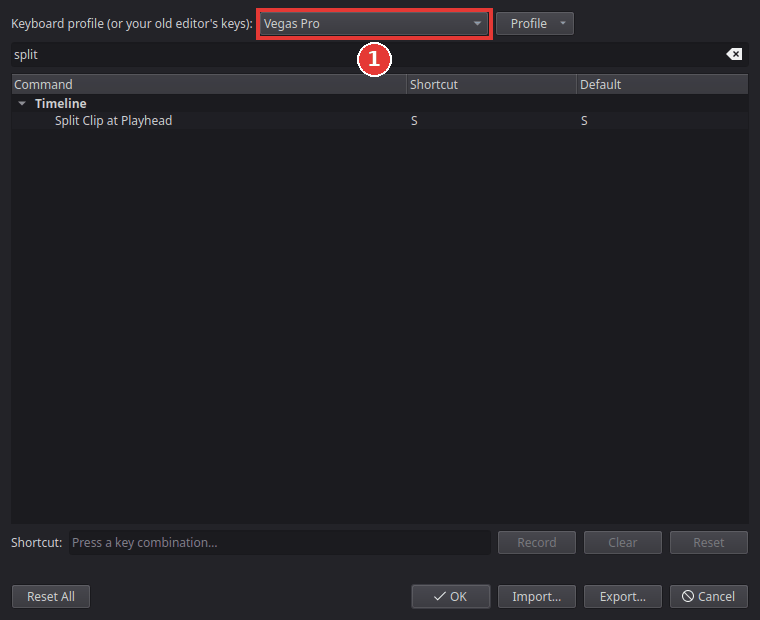
Open the list at the top, Keyboard profile, and pick your old editor (1). The keys change at once, and the Shortcut column shows the new ones; type a command in the search field to find it.
-
Click OK to keep them, or Cancel to go back to the keys you had.
Final Cut Pro is a Mac program: its Command key is Ctrl here, Option is Alt, and Control is the Windows (Super) key.
Not every command of the other editor exists in Kinoklip, and a few keys are best guesses. You can change any key yourself: select the command, click Record and press the new key. Your changes are kept with that profile, and Reset puts a single key back. Each preset's list of keys, with how sure we are of each and what is missing, is in the keyboard preset pages.
Bring your own shortcut file
If you changed the keys in Premiere Pro or Final Cut Pro, Kinoklip can read that file:
- In Keyboard Customization, click Import....
- Choose your Premiere Pro keyboard file (.kys) or your Final Cut Pro command set (.commandset).
Kinoklip makes a new profile from it, starting from that editor's preset. Below the list it
says how many shortcuts it took over and how many it skipped (commands Kinoklip does not have).
A Final Cut Pro command set saved in the binary format must be converted first, on the Mac:
plutil -convert xml1 MyKeys.commandset.
Found a mistake? Edit this article on GitHub.